
Skip to content
BLIVE

Tools for TikTok LIVE streamers · Mac & Windows

Make every giftexplode on your stream

BLIVE AI turns fan gifts into cinematic effects. BLIVE GAME turns your live room into a playground your viewers play together. One account, two apps, ready the moment you go live.

New accounts get a 14-day free trial automatically · No credit card to sign up

BLIVE phoenix mascot
LIVE
TikTok gifts mappable
5000+
TikTok gifts mappable
Gift to effect
≈200ms
Gift to effect
interactive live games
22
interactive live games
interface languages
9
interface languages
vertical link-source quality
1080p
vertical link-source quality

Two apps · One account

Pick what you need, or run both

BLIVE AI handles gift effects and stream overlays. BLIVE GAME is dedicated to interactive viewer games. Both apps can be installed and run at the same time.

BLIVE AI

Gift effects · Voice triggers · Face masks

  • Effects fire about 200 ms after a gift, with 5000+ gifts mapped by name
  • 70+ built-in effects, or upload your own video / audio and bind it to any gift
  • Voice keywords, comments, follows and likes can all trigger effects
  • One-click OBS setup, or use the transparent capture window with TikTok LIVE Studio
  • Prize wheel, gift jar, banners, timer challenges, photo albums and more stream overlays

BLIVE GAME

Viewers play with comments, likes and gifts

  • 20+ games including Adoption Park, BLIVE TV, City Battle and Plinko
  • Rebind the gifts of every game; 707 TikTok gifts built in
  • Link source renders natively at 1080×1920 for the sharpest picture
  • Pop-out window locked to 9:16, switchable to 16:9 landscape
  • Streamer camera pop-up with beauty filter on by default

Sign in to BLIVE AI and BLIVE GAME with the same bliveai.com account. Plans work in both.

BLIVE GAME

22 interactive live games viewers can't put down

Everything below is real in-app footage. Viewers type to join, like to power up and send gifts for big moves — set up a game and you're free to chat.

Flagship games▶

BLIVE Adoption Park

Adopt a pet with your own profile picture in a 3D park, then raise it, fight, propose and hold a chapel wedding. Pets are saved long term.

How to play →
Flagship games▶

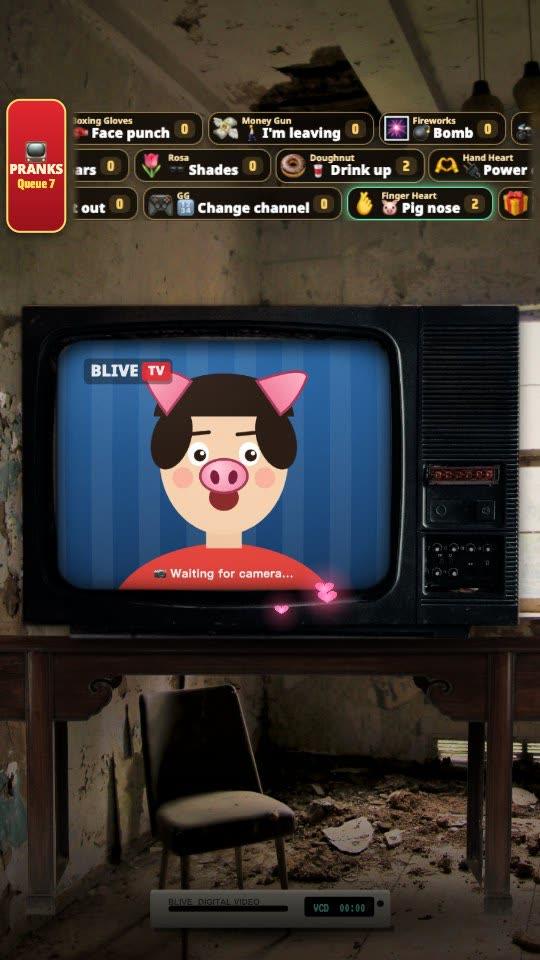
BLIVE TV

Your camera feed sits inside a retro TV, and viewers send gifts to prank the TV and you.

How to play →
Team battles▶

City Battle

Viewers comment a city name to join its team and score points for it with gifts, likes or comments. The top city becomes champion.

How to play →
Luck & collecting▶

Plinko

Gifts drop balls with profile pictures from the top into 11 slots at the bottom. The closer to the edge, the higher the score.

How to play →
Party & interactive▶

Hit 0 = Stream Ends

Each keyboard press by the streamer takes the number down by 1. Hit 0 and the stream ends. Fan gifts, follows and likes add the number back.

How to play →
Party & interactive▶

Live Printer

When viewers send gifts, the printer on the desk prints their profile picture line by line with their name. Big gifts print as magazine covers.

How to play →

BLIVE AI

Gift effects that fire on their own

Built for live streaming: set your rules once and the whole stream runs automatically.

Getting started

Start your first stream in three steps

No editing, no plugins, no green screen.

  1. Download and sign in

    Download BLIVE AI or BLIVE GAME, click “Sign in” and log in to your bliveai.com account in the browser. New accounts come with a 14-day trial.

  2. Go live first, then connect

    Start your TikTok LIVE first, then enter your TikTok username (without @) in the app and click “Connect”.

  3. Add the picture to your stream

    Use the link source (TikTok LIVE Studio “Link” / OBS browser source 1080×1920), the pop-out window, or one-click OBS setup.

Read the full beginner guide →

Plans

Pricing

Start free. Upgrade when you're ready.

Trial

Free14 days, all features
    Start free trial

    Free

    ForeverLimited features
    • ✓5 gift rules
    • ✓1 region
    • ✓No custom uploads
    Download free
    Most popular

    Pro

    $14.99/month
    • ✓Unlimited rules
    • ✓All 13 regions
    • ✓Unlimited video + audio uploads
    • ✓All 9 languages
    • ✓Priority support
    MAX

    Max · Creator Exclusive

    $50/mo
    • ✓Everything in Pro
    • ✓👕 Your own custom look: your name on the avatar’s outfit / hair clip
    • ✓Turn off the “Streamers Wanted” badge
    • ✓10 devices at once

    All plans use the same bliveai.com account, shared by BLIVE AI and BLIVE GAME. Prices are in US dollars, paid securely through Stripe, and you can cancel anytime in your dashboard.

    FAQ

    What is the difference between BLIVE AI and BLIVE GAME?
    BLIVE AI handles stream packaging: gift effects, voice triggers, prize wheel, gift jar, face masks and more. BLIVE GAME is a standalone interactive game app that opens straight into the game lobby. You can also open the games inside BLIVE AI. Both use the same account and can run at the same time.
    Do I need OBS?
    No. In TikTok LIVE Studio you can add the game with a “Link” source, or use the pop-out window with “Window Capture”. If you use OBS, either a browser source or one-click setup works.
    Which computers are supported?
    macOS 11 or later (separate installers for Apple silicon and Intel) and Windows 10 / 11 (64-bit).
    Is my TikTok account safe?
    The app never asks for or stores your TikTok password. It only reads the public gift, comment, like and follow events in your live room.
    Why does it say “live not found”?
    You must actually be live on TikTok before you click Connect. Make sure you typed the username of the account that is live and spelled it correctly. Having only the live tool open without going live also shows this error.
    How do I contact support?
    Email support@bliveai.com with your account email, app version and operating system version, and a screenshot if possible.

    Heat up your live room tonight

    Download BLIVE AI or BLIVE GAME and sign up to start your 14-day free trial.

    Mac (Apple silicon / Intel) and Windows 10/11 · Cancel anytime