
 BLIVE AI
Fans send a gift, the effect fires automatically
BLIVE AI listens to gifts, comments, likes and follows in your TikTok live room in real time and plays effects on your stream according to your rules. Set it up once and you never have to trigger anything by hand.
- ≈200ms trigger
- 5000+ gifts
- 70+ built-in effects
- 9 languages
- 13 gift regions
- One-click OBS setup
Core features
A live stream built for gifting
Not stickers and overlays, but moments that make fans want to send the next gift.
Every gift gets its own effect
Pick an effect for any TikTok gift in the gift menu. About 200 ms after fans send it, it plays on your stream, and combos can fire it again and again.
- 5000+ gifts mapped by name, with gift lists for 13 regions
- Each rule has its own cooldown and combo retrigger limit
- 🧪 Test button previews effects without real gifts
Lucky wheel: turn gifting into a draw
Chosen gifts spin the wheel, which can land on effects, streamer challenges, uploaded videos or a fan photo album. The wheel can also stay in a corner of your stream.
- 2–12 slots, each with its own weight
- Slot types: effect / streamer action / video / album
- Adjustable spin time, size and position
Gift jar: a goal everyone can see
Gifts, diamonds, likes and follows all fill the jar. When it's full it fires a top-tier effect or plays an album, then resets automatically for the next round.
- 6 styles: glass jar, heart, gift box, progress bar and more
- Fill by chosen gifts, total diamond value, likes and more
- Albums come in cinematic, photo-frame and photo-wall styles
A cinematic effects library, plus your own
70+ built-in effects (including 20+ cinematic video effects) designed for 9:16 vertical video. You can also upload your own video and audio for signature effects nobody else has.
- Video: MP4 / WebM / GIF, up to 50 MB
- Audio: MP3 / WAV / OGG / M4A
- Uploaded effects work in all rules, wheels and gift jars
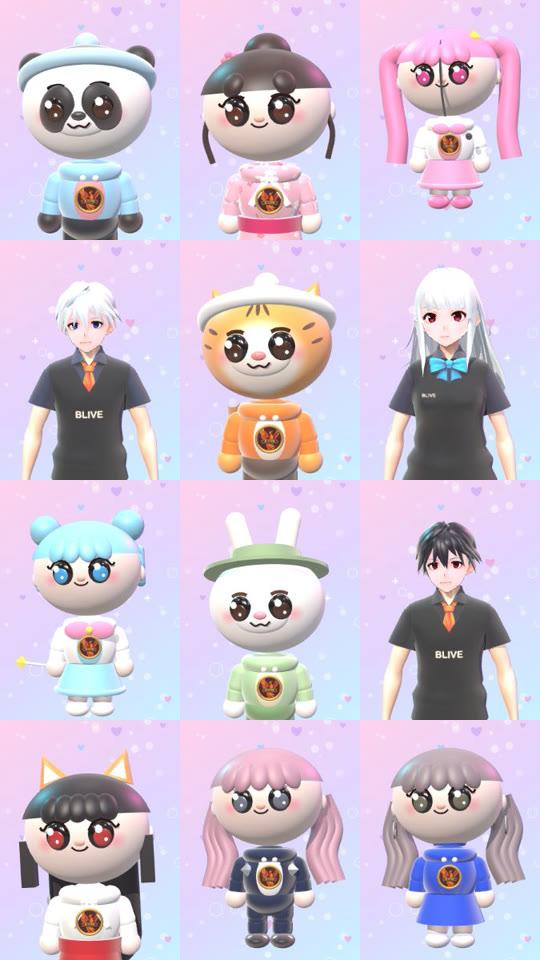
Face masks: stream without showing your face
Your camera drives a 3D avatar that follows your expressions, fingers and arms. Or show yourself with beauty filter, blur or background removal and put on a cute mask.
- 49 3D avatars, plus import your own .vrm / .glb
- 13 masks, beauty filter on by default
- Voice changer with 12 voices (needs a virtual microphone)
All features
Everything a live stream needs, already built
Every feature has a guide. Click a card to read it.
Comment / follow / like triggers
Trigger effects when a keyword appears in comments, when someone follows, or when likes reach a target.
Learn more →Voice keywords
9 recognition languages; say a keyword and the effect fires. Uses online speech recognition, so Google services must be reachable.
Learn more →Timer challenges
Gifts add time to a challenge for the streamer. A persistent countdown shows on screen and says “Done!” at zero.
Learn more →Banners, sidebars, leaderboard
Top banner (text / image / video), gift guide sidebars, comment bubbles and today's Top leaderboard.
Learn more →Transparent capture window
A truly transparent, always-on-top 9:16 window that any streaming software can grab with Window Capture. No green screen.
Learn more →One-click OBS setup
Turn on the OBS WebSocket and click “Add to OBS” to add the browser source to your current scene automatically.
Learn more →Effects with real sound
Effect audio is synced with the picture, and the capture window's sound can go straight into your stream.
Learn more →9 languages · 13 regions
The interface comes in 9 languages, and the gift list switches between 13 TikTok regions.
Learn more →Automatic updates
New versions download in the background and install after your stream ends, then reconnect automatically. Your live is never interrupted.
Learn more →
BLIVE AI also opens every BLIVE GAME game
Want a standalone game app? Download BLIVE GAME. It opens straight into the game lobby, with the same account.
BLIVE AI FAQ
Can I use the effects in TikTok LIVE Studio?
Do voice keywords need an internet connection?
Is there a size limit for uploaded effects?
One-click OBS setup won't connect?

Make gifts matter on your next stream
Sign up to start your 14-day free trial. Works on both Mac and Windows.